 Skip to content
Affiliate Marketing · Review
Short answer: yes, ClickBank is legit. It has operated from Boise, Idaho since 1998, has been BBB accredited with an A+ rating since 2011, and holds a 4.5 TrustScore from over 6,400 Trustpilot reviews. It’s free to join and pays real commissions. The catches are in the small print: you won’t be paid until you’ve made five sales using two different payment methods, each payout costs $5, inactive accounts are charged dormancy fees, and product quality varies a lot. ClickBank sells the products, but it doesn’t vouch for them.
Most ClickBank reviews either repeat the sales pitch (“up to 90% commissions!”) or come from someone who made no money and called it a scam. Neither tells you what you actually need to know before signing up: what it costs, when you get paid, and why some people never see a payout.
This review covers all of that, with every fee and payout rule taken from ClickBank’s own help centre and accounting policy, checked in October 2026. I’ve worked as an affiliate for about six years on ClickBank, JVZoo, WarriorPlus and Digistore24, so this is written from the affiliate’s side.
If you’re still deciding which network to start with, my guide to the best affiliate programs for beginners compares ClickBank with nine others side by side.
In this review
- ClickBank at a glance
- What ClickBank is and how it works
- Is ClickBank legit? The evidence
- ClickBank fees for affiliates
- How and when you get paid
- What the complaints are really about
- Is ClickBank safe for buyers?
- How to pick a ClickBank product
- Pros and cons
- ClickBank vs the alternatives
- The easiest way to start on ClickBank
- Verdict
- FAQ
ClickBank at a glance
| Company | Click Sales, Inc., Boise, Idaho. In business since 1998. |
|---|---|
| Cost to join | Free for affiliates |
| Commissions | Set by each seller. ClickBank advertises up to 90%. Offers are paid as revenue share (a percentage, including upsells and rebills) or CPA (a fixed amount). |
| Tracking | 60 days from the click; the last affiliate whose link was clicked gets the sale |
| First payout rule | 5 sales using at least 2 different payment methods, then a 14-day wait |
| Payout schedule | Weekly (direct deposit only) or every two weeks, always on a Friday |
| Payout methods | Direct deposit, wire, Payoneer or paper check. Not PayPal. |
| Payment threshold | $100 by default, adjustable |
| Fees | $5 per payment, $45 per wire, dormancy fees after 90 days with no earnings |
| Ratings | BBB A+ (accredited since 2011) · Trustpilot 4.5 from 6,438 reviews |
| Our rating | 4.0 / 5: a reliable network with real rules beginners need to know |
What ClickBank is and how it works
ClickBank is an online marketplace for mostly digital products: courses, ebooks, software and memberships, plus some physical products like supplements. Its best-known categories include health and fitness, self-help, spirituality, and business and make-money-online.
It sits between three groups:
- Sellers list their products and set the affiliate commission.
- Affiliates (you) pick products from the marketplace and promote them with a tracking link ClickBank calls a HopLink.
- Customers buy through that link. ClickBank processes the payment as the retailer, then splits the money between the seller and the affiliate.
Because ClickBank is the retailer, you’re paid by ClickBank, not by each seller. That’s the big advantage over promoting small sellers directly: one account, one payout, and a company with a long payment record handling the money.
If a customer clicks your HopLink and buys within 60 days, the sale is yours. If they later click another affiliate’s link before buying, the most recent affiliate gets the credit.
For how commissions, cookies and payouts work across all networks, see how you make money with affiliate marketing.
Is ClickBank legit? The evidence
“Legit” means two different things here, and it’s worth separating them.
As a company and payment platform, ClickBank is clearly legitimate:
- It has operated since 1998 (its BBB profile lists January 1998 as the start date).
- It has been BBB accredited since August 2011 and holds an A+ rating.
- It holds a 4.5 TrustScore from 6,438 reviews on Trustpilot (80% five-star, 11% one-star) as of October 2026.
- ClickBank says it has paid out more than $7.2 billion and has “never missed a payment” since it launched. Those are the company’s own claims, but they fit its long track record.
- It publishes its fees, payout rules and refund policy openly in its help centre.
As a guarantee of product quality, it isn’t one. ClickBank’s own website footer says its role as a retailer “does not constitute an endorsement” of the products it sells. The marketplace has excellent products next to weak ones, and some sales pages make claims you shouldn’t repeat. That’s where most of the “ClickBank is a scam” talk comes from: people bought a bad product through ClickBank.
The other source is affiliates who joined, made no sales, and concluded it doesn’t work. ClickBank gives you products and a link. It doesn’t give you traffic, and without traffic nothing sells. For how to tell a real affiliate opportunity from a real scam, read is affiliate marketing a scam?
ClickBank fees for affiliates
Joining is free, but ClickBank isn’t fee-free. These are the charges that can affect an affiliate, from ClickBank’s accounting policy and fees page:
| Fee | Amount | When it applies |
|---|---|---|
| Joining | $0 | Never |
| Payment processing | $5.00 | Every payment issued to you |
| Wire transfer | $45.00 | Per wire, if you choose wire payouts |
| Reprocessing | $20.00 | If a deposit or wire bounces because of wrong bank details |
| Dormant account | $1 per pay period | After 90 days with no earnings |
| Dormant account | $5 per pay period | After 180 days with no earnings |
| Dormant account | $50 per pay period | After 365 days with no earnings |
The dormancy fees catch people out, because ClickBank doesn’t warn you. Its help centre says plainly: “ClickBank will not notify you when your account becomes dormant.” The fees only come out of a positive balance and stop when it reaches $0, so they can’t put you in debt. But if you make a few sales, stop, and leave money sitting below your payment threshold, it gets eaten away. The fix is simple: lower your threshold so the balance gets paid out.
Seller fees are separate. If you sell your own product on ClickBank, there’s a one-time $49.95 activation fee, and ClickBank keeps 7.5% plus $1 of each standard sale. Affiliates don’t pay these.
How and when you get paid
This is the part most reviews skip, and it’s the reason for most “ClickBank never paid me” complaints. Your first payment depends on four conditions:
- The Customer Distribution Requirement. You need at least five sales, paid with at least two different payment methods (for example, some by Visa and some by PayPal). After the fifth qualifying sale there’s a 14-day wait before payments start. ClickBank calls this one of the most common reasons people don’t receive a payment they expected.
- Your payment threshold. The default is $100. If your balance is below it at the end of a pay period, no payment is issued. You can change it in your account settings.
- A payment method on file. Choose direct deposit, wire, Payoneer or paper check. ClickBank doesn’t pay to PayPal. Direct deposit is the fastest and avoids waiting for a check in the mail.
- Tax details. US affiliates who earn more than $600 need to provide a matching taxpayer ID.
Once you qualify, pay periods end at midnight Pacific time on a Wednesday, and payments go out on the Friday two days later. You can choose weekly (direct deposit only) or every two weeks, which is the default.
Example: you make four sales in your first month, all paid by credit card, for $160 in commissions. You’ll receive nothing yet. You need a fifth sale, and at least one sale paid with a different method, like PayPal. Fourteen days after you meet that rule, and once your balance is above your threshold, your first payment is issued (minus the $5 processing fee).
What the complaints are really about
Reading ClickBank’s 1-star reviews on Trustpilot (about 11% of the total), three themes come up again and again:
- Slow refunds for buyers. Customers report waiting longer than expected for a refund on a product they bought. This is the biggest group of complaints.
- Accounts disabled without much explanation. ClickBank can close accounts that break its terms. If you’re an affiliate, stick to honest claims and genuine traffic, and keep your account details accurate.
- Doubts about specific products. Many complaints are really about a seller’s product, not ClickBank as a platform.
The 5-star reviews mostly praise the support team for resolving problems quickly over live chat. That fits the overall picture: a platform that works and answers its customers, selling products that range widely in quality.
Is ClickBank safe for buyers?
Yes. Paying through ClickBank is safer than paying an unknown seller directly, because ClickBank handles the payment and the refunds. According to its help centre, the default refund window is 60 days. Sellers can set it between 30 and 90 days per product, and purchases made with PayPal get 180 days.
To look up an order or request a refund, go to ClickBank’s customer support site at clkbank.com. Your card statement shows ClickBank as the seller even if you bought on a different website, because ClickBank is the retailer.
For affiliates, this is a selling point: you can tell your readers the purchase comes with a refund guarantee backed by ClickBank, not just by an unknown seller.
How to pick a ClickBank product
Choosing the right product decides most of your results. ClickBank’s marketplace shows stats for each offer, based on the last 90 days:
- Gravity: the number of different affiliates who earned a commission from the product in the past 90 days. A product with some gravity has proven it sells. A very high number means more competition.
- Average $ per conversion: what affiliates earn on average per sale, including upsells and rebills.
- Refund and chargeback rates: shown in the product’s charts. High refunds are a red flag about the product and they reverse your commissions.
- Conversion rate and EPC: how often clicks turn into sales and the average earnings per click.
Then do what the numbers can’t: read the sales page as a buyer would. If it promises fast, guaranteed results (“lose 30 pounds in 30 days”, “$500 a day on autopilot”), skip it. The FTC says affiliates can be held responsible for deceptive claims they repeat (see its endorsement guides), and products that over-promise tend to have high refund rates anyway.
Finally, pick a product that matches the audience you can actually reach. A great product in a niche you can’t get traffic for will earn nothing.
Pros and cons
| Pros | Cons |
|---|---|
| Free to join, with most products open to promote without approval | No payout until 5 sales from 2 payment methods |
| Long track record: running since 1998, BBB A+ | $5 fee on every payment, $45 per wire |
| High commissions on digital products, often 50% or more | Dormancy fees on inactive balances, with no warning |
| Recurring commissions on subscription offers | Product quality varies widely |
| One account, one payout for thousands of products | No PayPal payouts |
| Weekly payouts available by direct deposit | Marketplace categories are competitive, especially health |
ClickBank vs the alternatives
ClickBank’s closest competitors are the other digital product marketplaces:
| Network | Cost to join | Approval | Payout rules |
|---|---|---|---|
| ClickBank | Free | Most products open | Weekly or every two weeks; 5-sale rule; $5 per payment |
| Digistore24 | Free | Instant marketplace access | Up to three times a week, no minimum threshold |
| JVZoo | Free (one-time $5 identity check for payouts) | Each seller approves you | Set by each seller |
| WarriorPlus | Free | Each seller approves you | New affiliates start with a 30-day payout delay |
For a beginner, ClickBank and Digistore24 are the easiest to start with because you don’t need to be approved by each seller. JVZoo and WarriorPlus are strong for make-money-online and software launches, but approvals are easier to get once you have some sales history.
The easiest way to start on ClickBank
The hard part of ClickBank isn’t the account. It’s what comes after: building a landing page, writing follow-up emails and finding a product that converts. That’s where most beginners give up.
CB Profit Club is built around exactly that problem. It’s run by John Thornhill, a long-time ClickBank seller, and its free Team tier gives you your own copy of a done-for-you membership funnel tagged with your ClickBank affiliate ID, plus a pre-written follow-up email campaign you import into your autoresponder. Commissions are paid through your ClickBank account, and you earn 50% on upgrades at the free level.
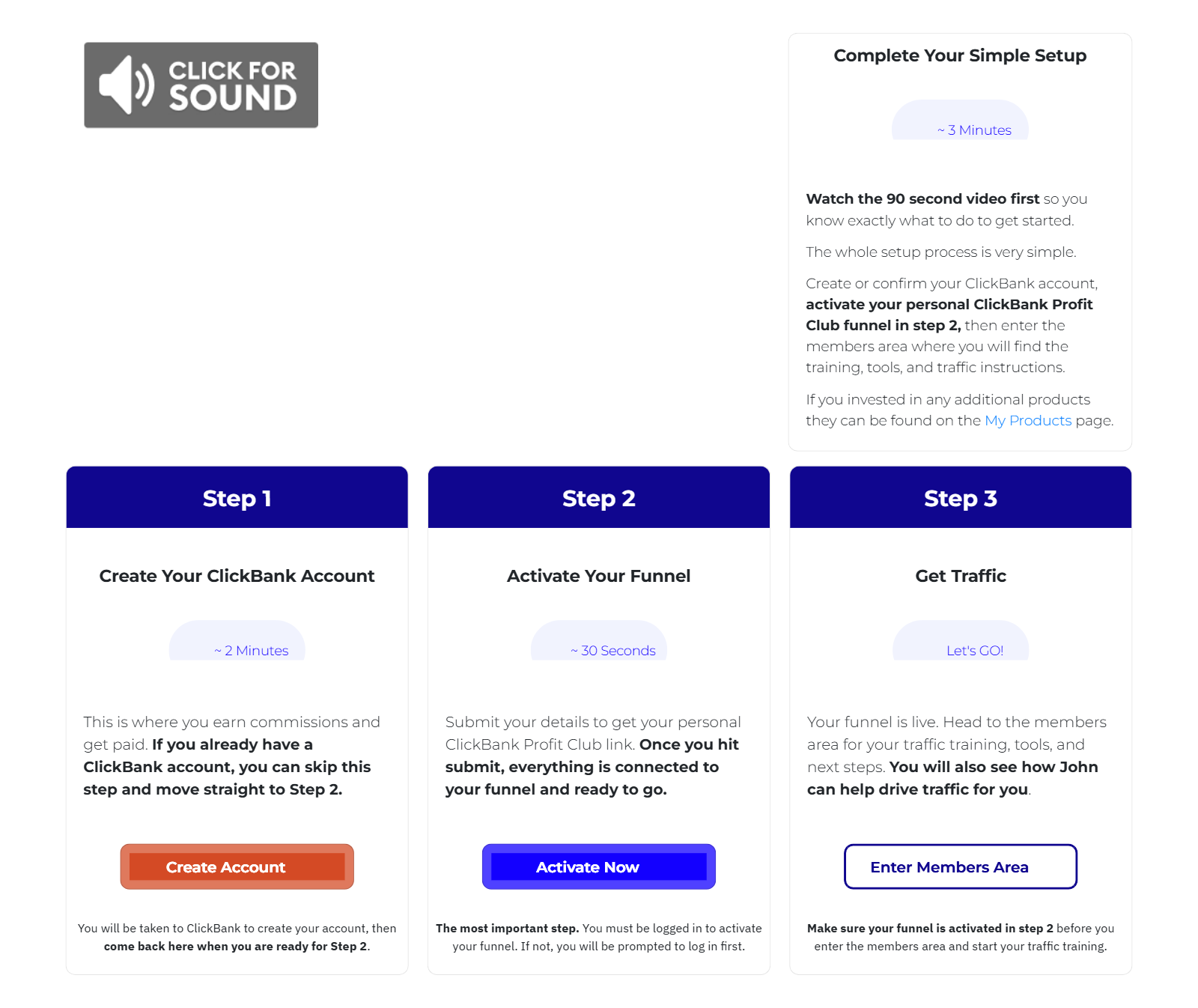
It doesn’t remove the need for traffic, but it handles the funnel and email follow-up, which is the part that stops most people before their first sale. It also helps with the five-sale rule, because your funnel keeps following up with every lead automatically.
For screenshots of the members area, real leaderboard figures and what the paid VIP level adds, read my full CB Profit Club review.
Verdict
ClickBank is a legitimate, long-running affiliate network that pays reliably, and it’s one of the easiest places to make your first affiliate sale because you can promote most products without approval. It earns 4.0 out of 5 from me.
It loses points for rules that hit beginners hardest: the five-sale, two-payment-method requirement before your first payout, a $5 fee on every payment, silent dormancy fees, and a marketplace where you have to do your own quality checks. Know those rules going in, choose products carefully, and ClickBank is a solid place to start.
To see how ClickBank compares with Systeme.io, Digistore24, Kit and six other programs, read my 10 best affiliate programs for beginners.
FAQ
Is ClickBank legit or a scam?
ClickBank is legit. It has operated since 1998, holds an A+ BBB rating, has been accredited since 2011, and has a 4.5 TrustScore on Trustpilot. Most “scam” complaints are about individual products sold through ClickBank, or about affiliates who didn’t get traffic, not about ClickBank failing to pay.
Is ClickBank free to join?
Yes, joining as an affiliate is free. You’ll pay a $5 processing fee on each payment you receive, $45 if you choose wire transfers, and dormancy fees if your account has a balance but no earnings for 90 days or more. Sellers pay a separate $49.95 activation fee.
Why haven’t I been paid by ClickBank?
The most common reasons are not yet meeting the Customer Distribution Requirement (five sales paid with at least two different payment methods, followed by a 14-day wait), a balance below your payment threshold (default $100), no payment method set, or incorrect bank details.
How does ClickBank pay you?
By direct deposit, wire transfer, Payoneer or paper check, weekly (direct deposit only) or every two weeks. Payments are issued on Fridays. ClickBank doesn’t pay affiliates through PayPal.
Can a beginner make money on ClickBank?
Yes, but it depends on traffic, not the account. ClickBank gives you products and a tracking link. You still need people to see your recommendation, through search, YouTube, social media or an email list. A done-for-you funnel like CB Profit Club’s free tier can handle the landing page and follow-up emails.
How do I get a refund from ClickBank?
Go to ClickBank’s customer support site at clkbank.com to look up your order and request a refund. The default refund window is 60 days, sellers can set 30 to 90 days per product, and PayPal purchases get 180 days.
What is a good gravity score on ClickBank?
Gravity is the number of different affiliates who earned a commission from a product in the past 90 days. Some gravity shows a product is selling; very high gravity means heavy competition. Check it alongside the average earnings per conversion, refund rate and the sales page itself.